Someone kind to talk to.News of them, wherever you are.
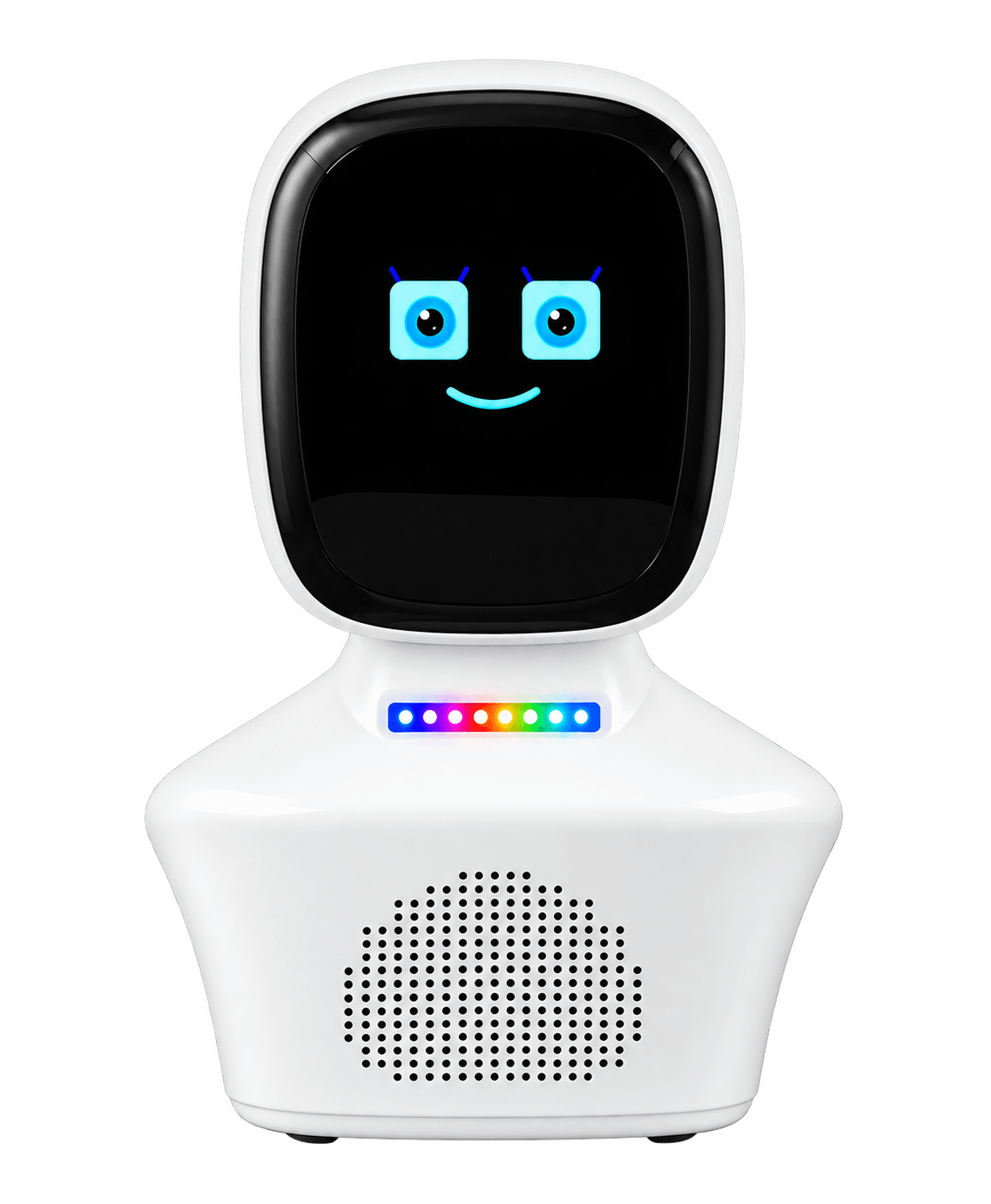
Senior Care Buddy is a small talking companion for your parents' home. It chats with them in their own language, plays your voice messages, reminds them gently, keeps their mind busy with games, laughter, breathing and meditation, and tells you how they are.
Speaks their languageMalayalam, Hindi, Tamil, Telugu, Urdu and English
Nothing to learnNo smartphone or app needed. Just touch and talk
You stay closeSee their replies from anywhere in the world
നമസ്കാരംनमस्तेவணக்கம்నమస్కారంآدابHello
Voice message from Ravi"Amma, did you take your morning tablets?"
Amma replies"Yes mone, after breakfast."
To Ravi, in Dubai✅ All OK, with her words
For families who live far away
You call every day. The days are still long.
Your parents raised you to go far. Now they're at home, and you're in another city or another country, checking your phone between meetings and hoping everything is fine.
Buddy doesn't replace your call. It fills the hours in between, with a voice that answers, games that keep them sharp, and a quick word to you on how they are.
01
The phone rings and rings
Did they forget their tablets, or just leave the phone in the other room? You can't tell from far away.
02
Long, quiet afternoons
Hours with only the TV for company. Fewer conversations, fewer reasons to think, remember and laugh.
03
Hearing about it too late
A bad day, a raised voice at home, a "no, I'm fine" that wasn't. You find out weeks later, if at all.
Watch · under a minute
See Buddy with a parent at home.
A quick look at Care Buddy for ageing parents back home: what it does for them, and how it keeps you in the loop from wherever you are.
Every feature is switched on per Buddy, at the times you choose, so it suits your parents' day rather than a gadget's.
Check-ins that wait for a reply
Send a question like "Have you eaten?" and tick Ask for a reply. Buddy asks, listens for the answer, and marks it All OK or Needs attention. No answer? It asks again after 15 minutes, up to three times.
For them: a friendly question, not a phone to find.For you: their reply, in their words, by email.
Your voice, not a robot's
Record a message in your browser, up to a minute, or pick a voice note. Buddy plays your own voice at home, with the words shown on its screen.
For them: hearing their child or grandchild, any time of day.For you: a hug in under a minute, from any time zone.
Reminders that repeat
Tablets at 8, a walk at 5, a call to cousin Leela on Sunday. Set reminders once or on chosen days. Buddy speaks them, and they can also go out as an SMS or a phone call.
For them: fewer things to keep in their head.For you: set it once and stop worrying.
Care listening, with consent
If you choose, Buddy listens to the room for 20 seconds every few minutes, with a red dot on its screen, and emails the family if it hears what may be a quarrel, abuse or a call for help.
For them: someone notices on the hard days.For you: an early word, without anyone listening all day.
Brain games, a few times a day
Mental maths, memory games, days and months, riddles, proverbs, odd one out, word games, a memories chat, and a joke to finish. Easy, medium or hard. They can also just say let's play a game.
For them: fun, praise and a reason to think.For you: % right per game over 7 and 30 days.
New
"How are you feeling?"
Up to three times a day, never mid-conversation, Buddy asks how they're feeling. A cheerful answer gets warm encouragement. If it sounds like pain, low mood or distress, Buddy replies with care and emails the family.
For them: being asked, and being heard.For you: an email when an answer sounds worrying. Switched on only with consent.
New
Guided pranayama and gentle warm‑ups
Buddy asks shall we begin? at the times you set, and starts only on a yes. After a short safety note it counts slowly, with real pauses: calm breathing, long exhale, anulom vilom, bhramari (humming bee), ujjayi, and if suitable, kapalbhati and bhastrika. Warm-ups loosen the neck, shoulders, arms, wrists and ankles, with marching and a gentle twist, seated or standing holding a chair, with rests in between. They can also just say let's do breathing.
For them: a daily routine they already know, with a patient guide.For you: sessions done this week on the dashboard. A Gentle only setting never offers the vigorous practices, for example after heart trouble or surgery. Check with their doctor first.
Speaks their language
Malayalam, Hindi, Tamil, Telugu, Urdu or English. Games, check-ins and chats all happen in the language set for their Buddy.
For them: no English needed, ever.For you: type in English; Buddy talks to them in theirs.
Touch and talk
Hold the touch pad on the front and speak. No buttons to hunt for, no screens to tap, no passwords. A small screen shows its friendly face and the words of your messages.
For them: as easy as talking to a person.For you: nothing to teach over the phone.
New
Hahaha!
Laughter sessions
A few minutes of guided, playful laughter: Buddy leads, with clapping and light-hearted laughter rounds, then a calm finish. It's offered at the times you choose, in their language, and only starts if they want to join in.
For them: a reason to laugh out loud, even on a quiet day at home.For you: knowing their day has some fun in it, not just reminders.
Looks after itself
If the Wi-Fi drops, Buddy reconnects on its own. If it can't reach us for a while, it restarts itself, and it does a quiet check-up restart in the small hours. A night mode keeps its lights dark while they sleep.
For them: no "switch it off and on" for anyone.For you: fewer calls home about a gadget.
New
Guided meditation
A few quiet minutes, led in a soft, slow voice with long, unhurried silences: settling into the breath, relaxing the body from head to toe, a moment of gratitude, or a calm wind-down before sleep. Seated, eyes open or closed. It's offered at the times you choose, in their language, and only starts on a yes.
For them: a calm, still pause in the day, with a gentle voice to follow.For you: knowing they have a peaceful moment, not just a busy schedule.
The family dashboard
One web page for the whole family: send messages and reminders, see check-in replies, game scores and alerts, and confirm their Buddy is online.
For them: nothing at all to manage.For you: the whole picture, from a phone or laptop.
Features are switched on per Buddy during setup. Some newer ones are still rolling out: we'll show you exactly what's available for your family in the demo.
A day with Buddy
From the first cup of tea to lights out.
Gentle warm‑up and breathing
Seated neck and shoulder rolls, then slow, long-exhale breathing. Breathe in… and let it all go, slowly.
Tablets, in your voice
Your recorded reminder plays. Amma answers, and you see All OK before your own day starts.
A quick brain game
Shall we play? Which day comes after Tuesday? Three questions, a score, and a joke to finish.
A chat after lunch
They ask Buddy anything, or share a memory: Tell me about a festival you loved.
"How are you feeling today?"
Buddy listens, and replies with something warm and encouraging.
A laughter session
Shall we have a good laugh together? A few minutes of clapping and playful laughter, led by Buddy.
Evening pranayama
A calm, guided few minutes of bhramari or long-exhale breathing to wind down.
A bedtime meditation
Let's sit quietly for a few minutes. A slow, gentle wind-down, with long, restful pauses.
Night mode
Buddy's lights go dark so the room stays restful. It's still there if they touch it.
A silent self check-up
A quick, quiet restart with no sound, so it's fresh for the morning.
An example day. You choose what's switched on and when, and change it any time from the dashboard.
Elderly monitoring for families
Know how they are, without hovering.
Buddy gives you a gentle, respectful view of their day. No cameras, no tracking, just their answers and the things they'd want you to know.
Check-in replies by email, marked All OK, Needs attention or No reply.
Care alerts to up to five family members, each with what it sounded like and the words picked up.
Feeling check-in alerts by email when an answer sounds like pain, low mood or distress.
Brain-game progress per game over 7 and 30 days, so you notice changes early.
Send from anywhere: type a message, record your voice, or set a repeating reminder.
Breathing and warm-up sessions they did over the last 7 and 30 days.
See that Buddy is online, and when it last restarted.
Amma's BuddyOnline
All OK"Yes mone, after breakfast."Check-in from Ravi · tablets
ReminderEvening walk with LakshmiMon, Wed, Fri · spoken on Buddy
GameMemory and riddles this weekPlayed most days · see the trend
Illustrative example
Privacy and consent
Their home. Their dignity. Their say.
Care listening is the most sensitive thing Buddy can do, so it has the strictest rules.
Off unless you choose it
Care listening is off by default. Only an account admin can switch it on, and every change is recorded in an audit log.
Consent, written down
Switching it on needs a consent tick and the name of the person who agreed: your parent, or their guardian. The date is saved with it.
Always visible
A red dot shows on Buddy's screen whenever it listens: 20 seconds at a time, every 5 to 60 minutes, and only when nobody is talking to it.
Ordinary sound stays put
Unless it gets loud for a few seconds, the sound is overwritten on the device and never leaves it. Loud moments that turn out normal are thrown away, not stored.
Deleted after 30 days
Alert clips are kept for 30 days for the family to review, then deleted automatically. Game results and wellness logs are kept for 180 days.
Never for children
Care listening and feeling check-ins need recorded consent, and can't be switched on for a Buddy set up for anyone under 18.
Please note: Buddy is a companion, not a medical device, a doctor or an emergency service. Its alerts are emails, so keep your usual emergency contacts and arrangements in place.
How it works
Three steps. No tech skills needed.
Book a free demo
We show you Buddy in your parents' language, and talk through their routine: tablets, walks, prayers, favourite topics.
We set it up for them
Language, voice, reminders, games, breathing and family contacts, all ready before it arrives. It just needs the Wi-Fi at their home.
Buddy moves in
Place it on a table and plug it in. They touch and talk; you follow along on the family dashboard from wherever you are.
Questions families ask
Before you decide
Does my parent need a smartphone or any tech skills?
No. Buddy sits on a table at home. They hold the touch pad and speak, the way they'd talk to a person. You manage everything else from the family dashboard on your own phone or laptop.
Which languages does Buddy speak?
Malayalam, Hindi, Tamil, Telugu, Urdu and English. You choose the language for your parent's Buddy, and its games, check-ins and chats all happen in that language.
How does a check-in with "Ask for a reply" work?
You send a message from the dashboard, typed or recorded in your own voice, and tick Ask for a reply. Buddy speaks it, listens for the answer, and saves it as All OK or Needs attention. The reply is emailed to you. If there's no answer, Buddy asks again after 15 minutes, up to three times, then marks it No reply and lets you know.
Is Buddy listening all the time?
No. Buddy listens when your parent touches it to talk, or for a reply right after it asks a question. Care listening is a separate option that is off by default. If an admin switches it on with recorded consent, Buddy listens for 20 seconds every 5 to 60 minutes, shows a red dot while it does, and only sends a clip when the room gets loud for a few seconds.
Who gets the alerts, and how?
Care alerts and worrying feeling check-ins go by email to up to five family addresses you choose. Check-in replies are emailed to the person who sent the check-in. Reminders can be spoken by Buddy, or sent as an SMS or phone call.
Are the breathing exercises safe for older people?
Buddy starts with a short safety note and guides familiar practices such as calm breathing, long exhale, anulom vilom, bhramari and ujjayi at a slow pace, plus light warm-ups seated or holding a chair. Kapalbhati and bhastrika are faster, so the Gentle only setting never offers them, even if asked; we suggest it for high blood pressure, heart trouble, pregnancy or recent surgery. It isn't medical advice: please check with your parent's doctor first, and switch off any practice that doesn't suit them.
Does Buddy do meditation?
Yes, guided meditation is being added alongside the breathing sessions. Buddy leads a few quiet minutes in a soft, slow voice, such as settling into the breath, relaxing the body or a calm wind-down before sleep, at the times you choose and only if they say yes. It's for calm and routine, not a treatment for any condition.
Can Buddy call an ambulance or detect a fall?
No. Buddy is a companion, not a medical device or an emergency alarm, and it has no camera. Keep your usual emergency contacts and arrangements in place.
What if the Wi-Fi at their home goes down?
Buddy needs home Wi-Fi to talk. If the Wi-Fi drops, it keeps trying to reconnect by itself, and if it can't reach us for a while it restarts on its own, so nobody at home has to switch it off and on.
What does Senior Care Buddy cost?
It depends on what your family needs: the Buddy device, setup, and a monthly plan for the features you switch on. We share exact pricing after your free demo, once we know your parents' routine.
Who can see our family's data?
Only the people you give a dashboard login to, plus our support team when you ask for help. Care clips are deleted after 30 days and game results after 180 days. We follow India's data protection rules on consent.
Free demo, no obligation
Give them a voice at home that always answers.
Book a free demo. We'll show you Buddy speaking your parents' language and running a real check-in, then share pricing on WhatsApp.